
How to Clean Your Navimow Robotic Lawn Mower (Deck, Blades & Grass Clumps)

Robotic mowers are about as close to "set it and forget it" as lawn care gets. You schedule it, it mows, it goes home and charges. But there's one piece of maintenance that people skip — and it's the one that quietly costs them cut quality, battery runtime, and eventually blade motors.
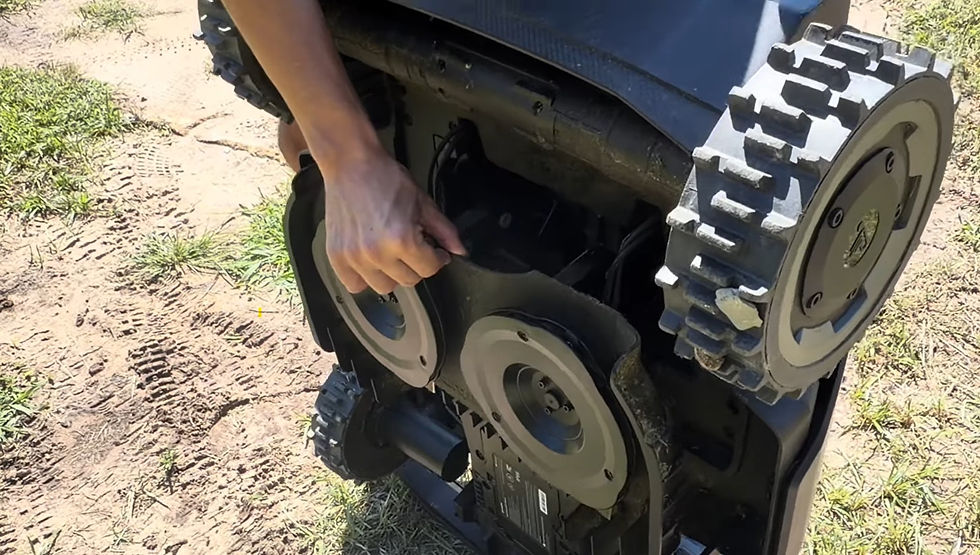
Cleaning the underside of the deck.
If you own a Segway Navimow, here's exactly how we clean them at Zippy Lawnz, why grass clumps up in the first place, and the one tool you should absolutely never point at your mower.
Why Cleaning the Deck Matters More Than You'd Think
A robotic mower doesn't cut like a traditional mower. Instead of one big blade taking off a couple inches at a time, a Navimow uses small razor blades on a spinning disc, taking off a tiny amount of grass every single day. Those clippings are supposed to fall right back into the lawn as mulch.
When the underside of the deck is packed with wet, compacted clippings, a few things start going wrong:
The blade disc can't spin freely. Buildup creates drag, which pulls more current and eats into your runtime.
Clippings stop falling through. Instead of mulching back into the turf, they pack tighter and tighter.
Cut quality drops. A blade dragging through a wall of packed grass isn't cutting cleanly — it's tearing.
Moisture stays trapped. Wet grass sitting against the deck and around the motor shaft is not what you want long term.
The good news: cleaning it takes about five minutes, and you only need to do it every week or two during heavy growing season.

Step 1: Put the Mower Into Cleaning Mode
Don't flip the mower over on the driveway. The Navimow has a cleaning mode built in for exactly this reason.
Cleaning mode drops the cutting deck down and safely disables the blades, so you get clear access to the underside without wrestling the whole machine around and without any risk of a blade disc spinning while your hands are near it.
Put it into cleaning mode from the app or the on-unit controls, wait for the deck to lower, and you're ready to work. It's a small feature, but it turns deck cleaning from an awkward job into a genuinely quick one.
Always confirm the blades are disabled before you put your hands underneath. Cleaning mode handles this for you, but it's worth a visual check every time.

Step 2: Blow the Deck Out With an Air Brush
Our go-to tool is an air brush — a nozzle attachment that combines compressed air with bristles. You get the mechanical action of a brush and the air pressure to blast packed clippings out of the corners at the same time.
Work around the blade disc, into the recessed areas of the deck, and around the edges where clippings collect first. Dried, packed grass will come off in sheets.
If you don't have an air brush, you've got good alternatives:
A shop air compressor with a blow gun attachment
Canned air / compressed air spray cans — the same kind you'd use on a computer keyboard
A stiff-bristled brush, plain and simple, for knocking loose the bulk of it
Take a look at the blades while you're under there. Navimow razor blades are wear items — if they're dull, nicked, or bent, swap them. They're inexpensive, and fresh blades make an obvious difference in how the lawn looks.

Why Grass Clumps Up: It's About Moisture, Not Grass
Here's the part most owners don't realize until they've lived with a robotic mower for a season.
If your mower is clumping badly, the problem usually isn't your grass or your mower. It's when you're mowing.
A lot of people schedule their robotic mower to run overnight or first thing in the morning — it's quiet, it's out of the way, and the lawn is free. Makes total sense. But early mornings and late nights are exactly when dew is heaviest.
Wet clippings behave completely differently than dry ones. Dry clippings are light and powdery and fall straight through the deck into the turf, which is exactly what you want. Damp clippings stick — to each other, to the deck, to the blade disc — and they pack down into a dense mat that hardens as it dries.
Mow in the dew every night and you'll be scraping the deck constantly. Shift the schedule and the problem often disappears on its own.
What to do about it:
Shift your mowing window to the drier part of the day — late morning through afternoon is ideal.
Avoid running right after rain or irrigation. Give the lawn time to dry.
In heavy dew seasons (spring and fall in our region), pull the schedule back from those overnight runs.
Check the deck more often during wet stretches, less often in dry ones.
Navimow units handle damp conditions fine — this isn't about protecting the mower from water. It's simply that a dry lawn cuts cleaner and leaves you with a lot less cleanup.
Never Use a Pressure Washer on a Robotic Mower
This is the one that causes real damage, and we see it every season.
A pressure washer seems like the obvious tool — it's fast, it's right there in the garage, and it blasts everything off in seconds. Don't do it.
A robotic mower is a sealed electronic device packed with motors, sensors, GPS/RTK antennas, wiring, and a battery. Those seals are designed to shed rain and dew. They are not designed to stand up to a focused jet of water at 2,000+ PSI. Pressure washing forces water past the seals and directly into places it will never fully dry out — bearings, motor housings, connectors, and the electronics bay.
The failures often don't show up immediately, either. Water gets in, corrosion starts, and weeks later you've got a sensor fault or a blade motor that won't spin. That's an expensive repair on a machine that only needed a brush and thirty seconds of air.
Stick with dry cleaning methods:
✅ Use this | ❌ Not this |
Air brush | Pressure washer |
Air compressor with blow gun | Garden hose sprayed into the deck |
Canned compressed air | Soaking or submerging the mower |
Stiff-bristled brush | Harsh solvents or degreasers |
Damp cloth for the outer shell | Scraping with metal tools |
If you need to clean the outside of the housing, a damp cloth is plenty. Wipe it down, let it dry, put it back on the dock.
A Simple Maintenance Rhythm
You don't need a complicated schedule. Here's what we recommend to our customers:
Every 1–2 weeks in growing season: Cleaning mode, air brush the deck, quick look at the blades.
Monthly: Wipe down the housing, clean the charging contacts on the mower and the dock, check the wheels and treads for packed debris.
Every 2–3 months (or as needed): Replace the razor blades. Sharp blades, clean cut, healthier lawn.
End of season: Full clean, blade replacement, and proper winter storage.
Five minutes every couple of weeks is the difference between a mower that runs beautifully for years and one that slowly gets worse until something breaks.
Questions We Get a Lot
Can I hose off my Navimow? Light rinsing of the outer shell is generally tolerated, but we don't recommend it — and never spray water up into the deck or at the underside. Dry methods do the job better anyway.
Why is my Navimow leaving clumps of grass on the lawn? Almost always moisture. You're either mowing in dew, mowing right after rain, or the grass has gotten too long between cuts. Move to a drier mowing window and increase your mowing frequency.
How often should I really clean the deck? Weekly during peak spring growth, every two weeks the rest of the season. If you're seeing clumping, clean it more often — and look at your schedule.
Do I have to use an air brush? No. A stiff brush and canned air will get you 90% of the way there. The air brush is just faster and gets into corners better.
Need a Hand?
Zippy Lawnz is an authorized dealer and service center for Segway Navimow, Mammotion, and Yarbo, serving Pennsylvania, Maryland, Delaware, Virginia, and Colorado. We handle professional installation, seasonal service, blade replacement, and warranty support — and we're happy to answer maintenance questions even if you didn't buy from us.
Have a robotic mower that's clumping, cutting poorly, or just due for a checkup? Get in touch and we'll take a look.
Watch the full walkthrough on our YouTube channel: How to Clean Your Navimow Robot Mower.
Comments